Apple AirTag 2 Review (2026): Better Range, Louder Speaker, and Smarter Tracking
Apple’s AirTag quickly became one of the most popular item trackers in the world. Whether you use it to keep track of keys, luggage, backpacks, or wallets, the tiny tracker integrates seamlessly with Apple’s Find My network. Now Apple has introduced the AirTag 2 (2nd Generation) with several meaningful upgrades while keeping the same familiar design.
The question is simple: Should you upgrade to AirTag 2, or is the original AirTag still good enough?
After reviewing the latest changes, features, pricing, and real-world performance, here’s everything you need to know.
What Is Apple AirTag 2?
The Apple AirTag 2 is Apple’s latest Bluetooth and Ultra Wideband tracker designed to help users locate lost items using the Find My network.
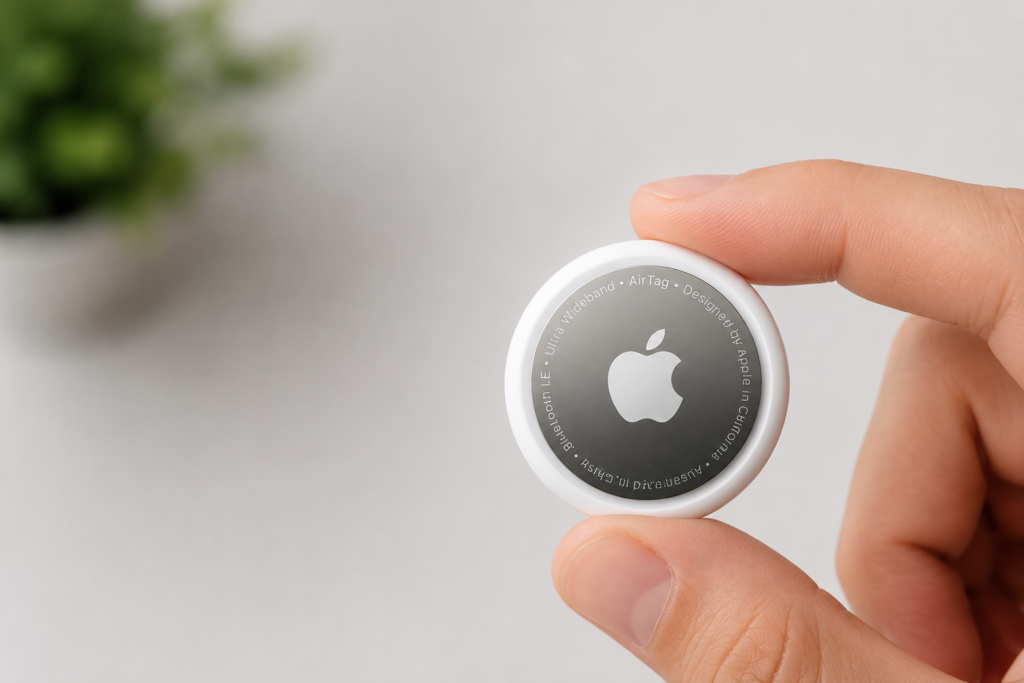
At first glance, the second-generation AirTag looks almost identical to its predecessor. Apple has intentionally maintained compatibility with existing accessories, holders, wallets, and keychains.
However, under the hood, AirTag 2 introduces several improvements:
- 1.5x longer tracking range
- 50% louder speaker
- Improved Precision Finding
- Apple Watch support for Precision Finding
- More sustainable materials
- Continued support for Find My Network
These updates focus on making lost items easier to locate while maintaining the simplicity users already love.
Apple AirTag 2 Price
Apple has kept pricing unchanged:
| Package | Price |
|---|---|
| Single AirTag 2 | $29 |
| Four-Pack | $99 |
The pricing remains competitive compared to other premium Bluetooth trackers.
For users who frequently travel or own multiple valuable items, the four-pack continues to offer the best value.
Design and Build Quality
One of the first things you’ll notice is how little has changed externally.
The AirTag 2 maintains the same:
- Circular shape
- Compact size
- Stainless steel back
- White front design
- Replaceable battery system
In fact, existing AirTag accessories work perfectly with the new version.
Small Visual Differences
The easiest way to distinguish AirTag 2 from the original model is the updated rear text layout and branding.
Aside from that, most users would struggle to tell them apart without placing them side by side.
Battery Life Remains Excellent
Apple continues to use the popular CR2032 coin battery, which is user replaceable.
This is excellent news because:
- No charging required
- Easy battery replacement
- Affordable replacement batteries
- Long lifespan
Most users can expect roughly one year of battery life before needing a replacement.
The battery compartment remains unchanged and can be opened by simply pressing and twisting the metal cover.
What’s New in AirTag 2?
Although the design remains familiar, Apple has improved several key areas.
1. Improved Bluetooth Range
The biggest upgrade is the improved Bluetooth performance.
Apple claims the new AirTag delivers approximately 1.5 times greater range compared to the original model.
In practical use, this means:
- Easier item detection
- Better tracking indoors
- Faster discovery in large spaces
- More reliable connection before relying on the Find My network
For travelers and frequent commuters, this upgrade can be particularly useful.
2. Louder Speaker
The second major improvement is the speaker system.
Apple redesigned the speaker to make AirTag alerts significantly louder.
Testing showed:
| Model | Maximum Volume |
|---|---|
| AirTag Gen 1 | 89-90 dB |
| AirTag Gen 2 | 95 dB |
A louder speaker makes it easier to locate:
- Keys hidden under cushions
- Luggage in crowded environments
- Backpacks in large rooms
- Bags in hotel rooms
While the difference may seem small on paper, it is noticeable in real-world use.
3. Precision Finding for Apple Watch
One of the most useful new features is support for Precision Finding directly on compatible Apple Watches.
Previously, Precision Finding was limited primarily to iPhone users.
Now users with:
- Apple Watch Series 9
- Apple Watch Ultra 2
- Newer compatible Apple Watches
can locate AirTag 2 items directly from their wrist.
This feature provides:
- Directional arrows
- Distance indicators
- Haptic feedback
- Real-time guidance
For many users, this will be one of the most practical upgrades.
Setting Up AirTag 2
Apple continues to offer one of the easiest setup experiences in the industry.
Pairing Process
Setup takes less than a minute:
- Pull the activation tab.
- Bring AirTag near your iPhone.
- Tap Connect.
- Assign a name.
- Finish setup.
Once paired, the AirTag immediately appears inside the Find My app.
Users can assign labels such as:
- Keys
- Backpack
- Wallet
- Luggage
- Camera Bag
Custom names are also supported.
Precision Finding Performance
Precision Finding remains one of Apple’s strongest advantages.
Using Ultra Wideband technology, AirTag 2 can guide users directly to an item with:
- On-screen arrows
- Distance measurements
- Sound alerts
- Haptic feedback
During testing, tracking remained accurate even when items were several feet away.
The combination of sound and directional guidance makes finding misplaced items remarkably easy.
Apple Watch Integration: Good but Confusing
While Precision Finding on Apple Watch is useful, the setup process is not very intuitive.
Unlike the iPhone experience, users must manually add AirTag controls through the watch’s Control Center.
Many users may need Apple’s documentation to discover how the feature works.
Once configured, however, the experience becomes much more convenient.
The watch can:
- Locate nearby AirTags
- Provide directional guidance
- Deliver haptic alerts
- Trigger sounds
For travelers, this feature is particularly valuable.
Find My Network Remains the Real Superpower
The biggest reason AirTag continues to dominate the tracker market is Apple’s massive Find My network.
Every compatible Apple device can anonymously help locate lost AirTags.
This means your lost item can potentially be found almost anywhere in the world.
Popular uses include:
Travel
Many travelers place AirTags inside:
- Checked luggage
- Carry-on bags
- Camera gear
- Passport holders
Everyday Carry
AirTags are also excellent for:
- House keys
- Wallets
- Backpacks
- Laptop bags
Family Use
Parents often use AirTags to track:
- School bags
- Sports equipment
- Travel gear
The Find My ecosystem remains one of Apple’s strongest competitive advantages.
Sustainability Improvements
Apple has also improved the environmental profile of AirTag 2.
The company states that the new model includes:
- 85% recycled plastic enclosure
- 100% fiber-based packaging
While these changes won’t affect day-to-day usage, environmentally conscious buyers may appreciate the effort.
AirTag 2 vs AirTag 1
Here’s a quick comparison:
| Feature | AirTag 1 | AirTag 2 |
|---|---|---|
| Bluetooth Range | Standard | 1.5x Longer |
| Speaker Volume | Good | 50% Louder |
| Apple Watch Precision Finding | No | Yes |
| Battery | CR2032 | CR2032 |
| Accessory Compatibility | Yes | Yes |
| Find My Network | Yes | Yes |
| Price | $29 | $29 |
Should You Upgrade?
Upgrade If:
✅ You frequently travel
✅ You rely heavily on AirTags
✅ You want louder alerts
✅ You own a compatible Apple Watch
✅ You need improved Precision Finding
Skip If:
❌ Your current AirTags work perfectly
❌ You rarely use tracking features
❌ You only use AirTags occasionally
The improvements are meaningful but not revolutionary.
Final Verdict
The Apple AirTag 2 is a thoughtful refinement of an already excellent product. Apple didn’t redesign the tracker or introduce flashy new features. Instead, the company focused on solving real-world problems by increasing range, boosting speaker volume, and adding Apple Watch Precision Finding.
For first-time buyers, AirTag 2 is easily one of the best Bluetooth trackers available today.
For existing AirTag owners, upgrading is optional rather than essential. The original AirTag remains highly capable, but the second-generation model delivers enough improvements to justify consideration, especially for frequent travelers and users deeply invested in Apple’s ecosystem.
Rating: 9/10
Pros
- Longer tracking range
- Louder speaker
- Excellent Find My integration
- Apple Watch Precision Finding
- Easy setup
- Replaceable battery
Cons
- Limited benefits for existing AirTag owners
- Apple Watch setup could be simpler
- Only works best within Apple’s ecosystem