Minimal Phone 2: The Most Distraction-Free Smartphone of 2026?
Most smartphones are designed to keep you scrolling.
The Minimal Phone 2 takes the opposite approach.
Instead of chasing bigger screens, endless notifications, and addictive social media feeds, this phone focuses on productivity, intentional usage, and digital minimalism.
After watching the latest Minimal Phone 2 demo and exploring everything revealed about Minimal OS, I genuinely think this device could become one of the most interesting Android phones for people who are tired of modern smartphone addiction.
What Is the Minimal Phone 2?
The Minimal Phone 2 is an Android-based smartphone built around one simple idea:
Use your phone less, but get more done.
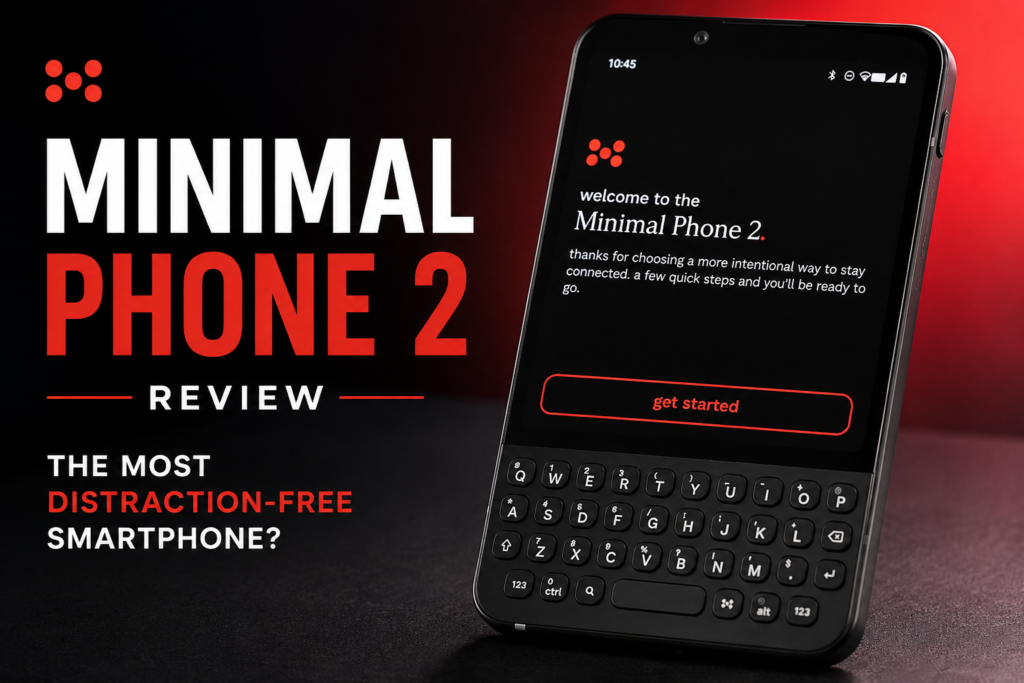
Unlike traditional Android devices, the Minimal Phone combines a physical keyboard, distraction-control tools, customizable productivity modes, privacy-focused AI, and a clean operating system called Minimal OS.
The goal isn’t to replace your laptop.
The goal is to help you reclaim your attention.
First Impressions: A Phone That Feels Different
Most smartphone launches focus on camera upgrades.
Minimal Phone 2 focuses on habits.
From the first setup screen, the device asks how much control you want over your digital life.
You can:
- Disable AI completely
- Run AI locally on-device
- Use cloud-based AI
- Connect your own AI model API
That level of choice is rare in today’s smartphone market.
For privacy-conscious users, the local AI option is especially interesting because your data never leaves the phone.
Minimal OS Is The Real Star
The hardware matters.
But the software is what makes this device unique.
Minimal OS removes unnecessary clutter and focuses on speed and simplicity.
Navigation is surprisingly straightforward:
- Swipe up for apps
- Swipe right-to-left for settings
- Swipe left-to-right for Minimal Hub
After a few minutes, everything feels natural.
There are no flashy animations fighting for your attention.
Everything exists for a purpose.
The Physical Keyboard Is More Powerful Than Expected
One feature that immediately stood out is the programmable keyboard.
Every key can perform custom actions through long-press shortcuts.
For example:
- Hold C to launch Chrome
- Hold M to open Messages
- Hold N to open Notes
Instead of searching through apps, you jump directly to what you need.
That may sound small.
In daily use, it could save hundreds of taps every week.
Minimal Phone 2’s Productivity Modes
This is where the phone becomes genuinely interesting.
Monk Mode
The strictest mode available.
Features include:
- No social media
- No browser access
- Always-on grayscale mode
Once activated, the only way to remove restrictions is a factory reset.
Focus Mode
A more balanced option.
You choose how much social media time you want daily.
Examples:
- 30 minutes
- 45 minutes
- 1 hour
When your limit is reached, that’s it.
The restriction cannot be bypassed without resetting the device.
Unrestricted Mode
For users who want complete freedom while still benefiting from Minimal OS features.
The Kill Switch Might Be My Favorite Feature
Privacy features are becoming increasingly important.
Minimal Phone 2 includes a dedicated kill switch that can disable:
- Camera
- Microphone
- Cellular
- Wi-Fi
- Bluetooth
You can even enable grayscale mode instantly.
This is the kind of feature normally found on niche privacy-focused devices.
Seeing it integrated directly into a mainstream productivity phone is refreshing.
Minimal Hub Keeps Everything Organized
Notifications are one of the biggest productivity killers.
Minimal Hub attempts to solve that problem.
Instead of jumping between apps, users can:
- Read messages
- View calls
- Check emails
- Review notifications
- Respond directly
Everything is centralized in one location.
The result is fewer distractions and less app switching.
Minimal Ask AI Is Surprisingly Practical
Unlike most AI implementations that feel like gimmicks, Minimal Ask focuses on everyday tasks.
For example:
- Check today’s schedule
- Find meeting locations
- Navigate to appointments
- Access calendar information
- Manage tasks
During the demo, the AI located an upcoming meeting and launched navigation instantly.
That’s the kind of practical assistance most people actually want.
Activity Bar: The Feature That Exposes Your Habits
One of the smartest ideas in Minimal OS is the Activity Bar.
You get:
- 24 dots
- One for each hour of the day
White dots represent productive hours.
Red dots represent unproductive hours.
Spend an hour doomscrolling on YouTube?
You’ll see the evidence immediately.
It’s a simple visual system that creates awareness without constantly nagging the user.
Pros and Cons
Pros
✔ Unique distraction-free approach
✔ Physical keyboard shortcuts
✔ Privacy-focused AI options
✔ Powerful Focus and Monk modes
✔ Useful kill switch functionality
✔ Clean and fast interface
✔ Excellent productivity tools
Cons
✘ Still in beta development
✘ Not designed for heavy gaming
✘ Limited appeal for social media power users
✘ Final software experience may change before release
Should You Buy the Minimal Phone 2?
If your biggest frustration with smartphones is distraction, the Minimal Phone 2 might be exactly what you’ve been waiting for.
This isn’t a phone trying to compete with flagship devices on camera quality or benchmark scores.
Instead, it’s solving a different problem.
Attention.
For students, entrepreneurs, writers, remote workers, and anyone trying to spend less time scrolling, the Minimal Phone 2 looks like one of the most promising productivity-focused smartphones currently in development.