Notion AI vs Google NotebookLM: Which AI Note-Taking Tool Is Better in 2026?
Artificial intelligence has completely changed the way we take notes, organize information, and manage knowledge. Traditional note-taking apps were once focused on storing text and keeping information organized. Today, AI-powered platforms can summarize documents, answer questions, generate content, and even help users understand complex topics faster.
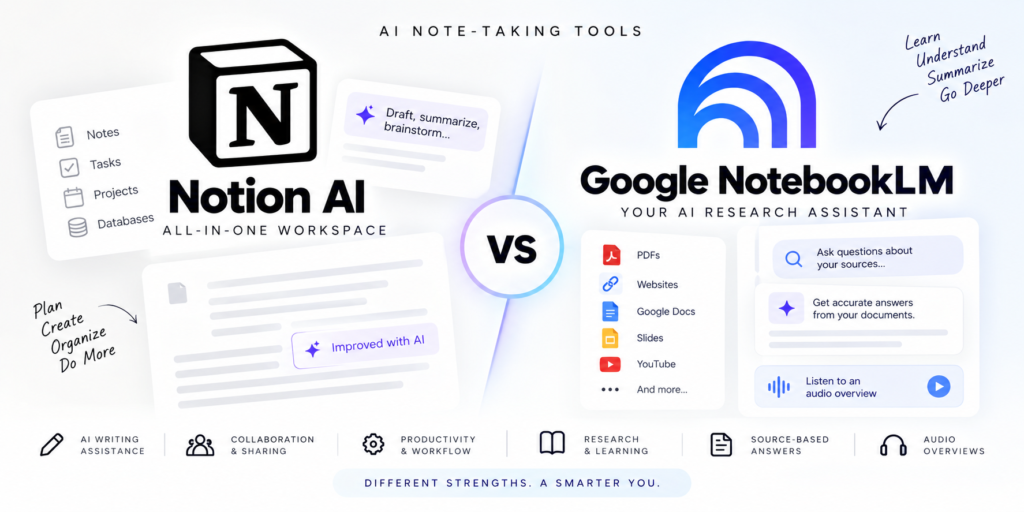
Two tools leading this transformation are Notion AI and Google NotebookLM. Both platforms use advanced AI technology, but they serve different audiences and workflows. While Notion AI focuses on productivity, collaboration, and workspace management, NotebookLM is designed for research, learning, and information analysis.
If you’re trying to decide between Notion AI and Google NotebookLM, this detailed comparison will help you understand their features, strengths, weaknesses, pricing, and ideal use cases.
What Is Notion AI?
Notion started as an all-in-one productivity platform where users could create notes, manage projects, build databases, track tasks, and collaborate with teams.
Over the past few years, Notion has evolved into much more than a workspace. The addition of Notion AI transformed it into a smart productivity assistant capable of helping users write, summarize, brainstorm, and organize information directly inside their workspace.
Instead of switching between multiple apps, users can manage notes, documents, projects, and AI-powered assistance from one dashboard.
Key Features of Notion AI
AI Writing Assistant
Notion AI can help create:
- Blog outlines
- Meeting notes
- Emails
- Social media content
- Reports
- Project documentation
It can also rewrite content in different tones and improve clarity.
Smart Summarization
Long documents can be condensed into concise summaries, bullet points, or action items.
This is particularly useful for meeting notes and research documents.
Brainstorming and Idea Generation
Users can generate ideas for:
- Content creation
- Business strategies
- Marketing campaigns
- Research topics
- Product planning
Translation Support
Notion AI can translate content into multiple languages without leaving the workspace.
Workflow Integration
Unlike standalone AI tools, Notion AI works directly inside your notes, databases, tasks, and projects.
This seamless integration is one of its biggest advantages.
What Is Google NotebookLM?
Google NotebookLM is an AI-powered research and learning platform built using Google’s Gemini AI technology.
Unlike Notion, NotebookLM is not trying to become a complete productivity workspace.
Instead, its primary goal is helping users understand, analyze, and interact with information.
Users can upload documents, PDFs, research papers, websites, Google Docs, presentations, and other content. NotebookLM then becomes an intelligent research assistant capable of answering questions based on those sources.
This makes it especially valuable for students, researchers, educators, journalists, and professionals dealing with large volumes of information.
Key Features of NotebookLM
Source-Based AI Answers
One of NotebookLM’s most impressive features is that it generates responses based on your uploaded sources.
Instead of providing generic AI answers, it references the information you’ve provided.
This reduces hallucinations and improves accuracy.
AI Summaries
NotebookLM can summarize:
- Research papers
- Textbooks
- Reports
- Articles
- Presentations
Complex topics can be explained in simpler language.
Audio Overviews
This feature has become one of NotebookLM’s biggest strengths.
The AI creates podcast-style audio summaries that allow users to learn while commuting, exercising, or multitasking.
Interactive Learning
Users can ask follow-up questions and explore topics in greater depth.
This creates a more engaging learning experience compared to traditional note-taking apps.
Google Ecosystem Integration
NotebookLM works naturally with:
- Google Docs
- Google Drive
- Google Slides
- Google Workspace
This makes adoption easier for users already invested in Google’s ecosystem.
User Interface and Ease of Use
Notion AI
Notion offers a clean and modern interface.
However, because it includes databases, project management, templates, collaboration tools, and AI capabilities, new users may initially feel overwhelmed.
Once users learn the basics, Notion becomes highly customizable.
The flexibility is both a strength and a weakness.
NotebookLM
NotebookLM is significantly simpler.
The workflow is straightforward:
- Upload sources
- Ask questions
- Get answers
The learning curve is minimal.
Most users can start using NotebookLM productively within minutes.
Winner: NotebookLM
For simplicity and ease of use, NotebookLM wins.
For customization and flexibility, Notion AI takes the lead.
AI Capabilities Comparison
AI functionality is where these two platforms differ the most.
Notion AI’s Strengths
Notion AI focuses on productivity.
It helps users:
- Write content
- Generate ideas
- Organize projects
- Create summaries
- Improve documents
The AI becomes part of your workflow.
NotebookLM’s Strengths
NotebookLM focuses on understanding information.
It helps users:
- Analyze documents
- Learn concepts
- Study materials
- Conduct research
- Ask questions about sources
The AI acts more like a research assistant.
Winner: Depends on Your Goal
Choose Notion AI if your goal is creating and managing content.
Choose NotebookLM if your goal is learning and understanding information.
Collaboration Features
Notion AI
Collaboration is one of Notion’s strongest areas.
Teams can:
- Share workspaces
- Assign tasks
- Manage permissions
- Edit documents together
- Build company knowledge bases
Real-time collaboration makes Notion ideal for organizations.
NotebookLM
NotebookLM supports sharing notebooks, but collaboration features remain relatively basic.
It is designed primarily for individual research and study.
Winner: Notion AI
For team collaboration, Notion is significantly more advanced.
Knowledge Management
Knowledge management is how effectively a platform stores, organizes, and retrieves information.
Notion AI
Notion uses:
- Pages
- Databases
- Tags
- Templates
- Relations
Users can build complex knowledge systems.
Large teams often use Notion as a company wiki.
NotebookLM
NotebookLM takes a different approach.
Instead of organizing information manually, users upload sources and let AI handle information retrieval.
The focus is less on organizing and more on understanding.
Winner: Tie
- Notion excels at organizing knowledge.
- NotebookLM excels at understanding knowledge.
Research and Learning
This category heavily favors NotebookLM.
Why NotebookLM Excels
Researchers can upload:
- Academic papers
- PDFs
- Books
- Reports
- Lecture materials
Then ask questions directly about those sources.
The AI provides context-aware answers based on uploaded materials.
Why Notion Falls Behind
While Notion AI can summarize information, it lacks NotebookLM’s source-centric research experience.
Winner: NotebookLM
For students, researchers, and academics, NotebookLM is currently one of the best AI-powered research tools available.
Pricing Comparison
Notion AI Pricing
Notion offers:
- Free plan
- Paid personal plans
- Business plans
- Enterprise plans
AI features are generally tied to premium subscriptions.
NotebookLM Pricing
NotebookLM offers:
- Free access for basic usage
- Premium options through Google’s AI plans
The free version already provides significant value.
Winner: NotebookLM
For budget-conscious users, NotebookLM currently offers more value at no cost.
Mobile Experience
Notion AI
Notion provides polished mobile applications for:
- Android
- iPhone
- Tablets
Users can edit notes, manage projects, and access AI features.
NotebookLM
NotebookLM works well across devices but remains primarily optimized for research workflows rather than productivity management.
Winner: Notion AI
Its mobile experience is more mature and feature-rich.
Security and Privacy
Notion AI
Data is stored in the cloud and protected through enterprise-grade security.
However, some users may have concerns about storing sensitive information online.
NotebookLM
NotebookLM also uses cloud-based storage but benefits from Google’s extensive infrastructure and security capabilities.
Winner: Tie
Both platforms provide strong security measures suitable for most users.
Pros and Cons
Notion AI Pros
- All-in-one productivity platform
- Powerful collaboration tools
- Excellent customization
- AI integrated into workflows
- Strong project management capabilities
Notion AI Cons
- Steeper learning curve
- AI requires premium plans
- Can become complex for beginners
NotebookLM Pros
- Outstanding research capabilities
- Source-based AI responses
- Audio summaries
- Simple interface
- Generous free version
NotebookLM Cons
- Limited project management features
- Basic collaboration tools
- Less flexible for productivity workflows
Who Should Use Notion AI?
Notion AI is best for:
- Content creators
- Marketing teams
- Project managers
- Business owners
- Remote teams
- Productivity enthusiasts
If you need one platform to manage work, documents, tasks, and AI assistance, Notion AI is difficult to beat.
Who Should Use NotebookLM?
NotebookLM is ideal for:
- Students
- Researchers
- Journalists
- Educators
- Analysts
- Knowledge workers
If your primary goal is understanding information faster and learning more efficiently, NotebookLM is the stronger option.
Final Verdict
Choosing between Notion AI and Google NotebookLM comes down to what you’re trying to accomplish.
Notion AI is a productivity powerhouse. It combines note-taking, project management, databases, collaboration, and AI assistance into a single workspace. For professionals and teams, it offers unmatched flexibility.
NotebookLM takes a completely different approach. Rather than managing projects, it focuses on helping users learn, research, and interact with information. Its source-based AI responses and audio overviews make it one of the most innovative research tools available today.
If you want a complete productivity ecosystem, choose Notion AI.
If you want the best AI-powered research and learning experience, choose Google NotebookLM.
For many users, the ideal solution may actually be using both. Notion AI can manage projects and notes, while NotebookLM can help analyze and understand information before it gets added to your workspace.
As AI-powered note-taking continues to evolve, these two platforms are setting the standard for how we work, learn, and manage knowledge in 2026.